Bifurcations with AUTO
model.auto runs XPPAUT's AUTO continuation. It is the same code XPPAUT's
AUTO window uses, driven by function calls. For the concepts, see
Bifurcation analysis with AUTO.
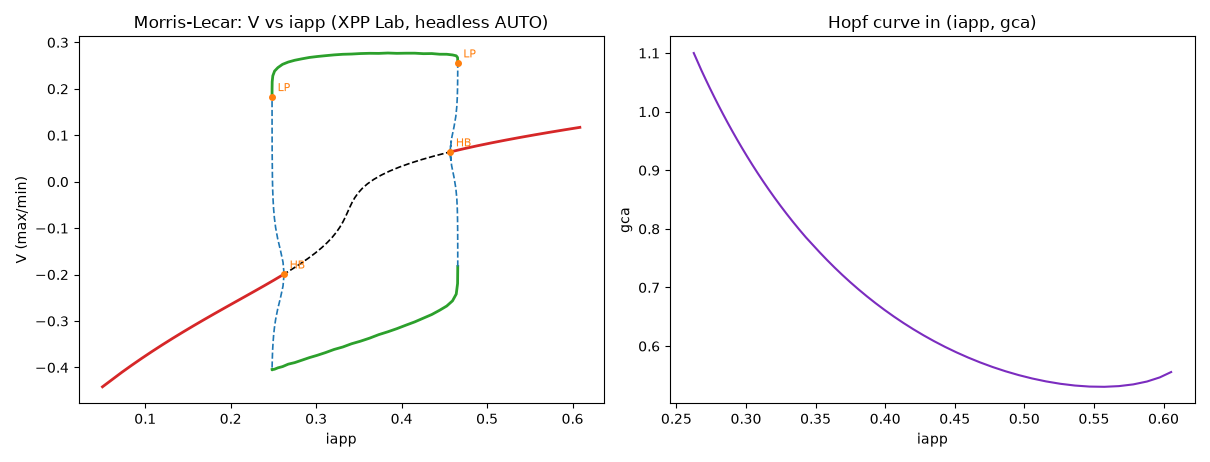
Steady states
m = xs.load("lecar.ode")
m.apply_set("hopf")
d = m.auto.equilibria("iapp", parmax=0.6)
equilibria() first moves the initial values onto a nearby equilibrium
with Newton's method, then follows it as iapp changes. It returns the new
points as a Diagram.
Special points
d.special()          # every labelled HB, LP, BP, PD, TR point
d.special("HB")      # only Hopf points
hb = d.first("HB")
hb.value, hb.parameter, hb.stable
d.label(3)           # the point with label 3
Each point carries multipliers, as XPPAUT's AUTO window stores them:
exp(λ) for steady states and the Floquet multipliers for periodic orbits.
Either way a point is stable when they lie inside the unit circle. For
steady states, point.eigenvalues recovers λ itself. Its real parts are
exact, and its imaginary parts are known modulo 2π.
Continuing from a point
orbits = m.auto.continue_from(hb, "periodic")        # limit cycles
hopf2 = m.auto.continue_from(hb, "two-parameter", second="gca")
# from a fold (LP) of a model that has one:
# m.auto.continue_from(d.first("LP"), "two-parameter", second="gca")
The actions available depend on the point, as in XPPAUT's menus:
| Point | Actions |
|---|---|
| HB | periodic, two-parameter, extend, new |
| LP | two-parameter |
| BP | switch, extend, new, two-parameter |
| PD | doubling, two-parameter, fixed-period, extend |
| TR | two-parameter, fixed-period, extend |
| periodic point | extend, fixed-period |
| steady-state point | extend |
An action that does not apply raises a ValueError that lists the ones
that do.
Settings
m.auto.set(ds=0.01, dsmax=0.05, nmax=500, npr=50, parmin=0, parmax=2, ntst=30)
m.auto.settings          # all of them, with xs.auto.SETTINGS explaining each
A negative ds continues towards smaller parameter values. Settings can
also be passed to equilibria() and continue_from() as keyword arguments.
The whole diagram
full = m.auto.diagram       # every point computed so far
full.plot("V")              # max/min of V; full.plot("norm") also works
full.to_pandas()            # one row per point
full.branches()             # {branch number: Diagram}
m.auto.reset()              # start over
Plots use XPPAUT's colours: red and black for stable and unstable steady states, green and blue for stable and unstable periodic orbits. Unstable branches are dashed, and special points are labelled.
Saving a diagram, and its orbits
m.auto.save("lecar.auto")        # settings, points and AUTO's restart data
m.auto.load("lecar.auto")        # later, or in another session: replaces the diagram
m.auto.continue_from(17, "extend")   # its labelled points carry on as before

sol = m.auto.orbit(6)            # the periodic orbit at point 6, one period
sol.plot("V")
The file is XPPAUT's .auto format (AUTO > File > Save diagram), so
XPPAUT and the desktop app open it too. Numbers are written in full, so a
loaded diagram is the one saved. orbit() is XPPAUT's Import orbit: the
orbit becomes the model's last run, and the analysis methods use it.